In today’s dynamic business environment, securing a business loan can be essential for growth, expansion, or managing operational costs. However, understanding the financial implications of taking on a loan is crucial. This is where a Business Loan EMI Calculator comes in handy. It allows you to calculate the Equated Monthly Installment (EMI) you will need to pay over the loan tenure, helping you plan your finances better.
How Does a Business Loan EMI Calculator Work?
The Business Loan EMI Calculator uses a standard mathematical formula to calculate the EMI:
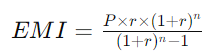
Where:
-
P is the principal loan amount
-
r is the monthly interest rate (annual interest rate divided by 12)
-
n is the loan tenure in months
By entering these values into the calculator, you can instantly see your EMI, which includes both the principal and interest components.
Steps to Use the Business Loan EMI Calculator
-
Loan Amount: Enter the total amount of the loan you wish to take.
-
Interest Rate: Provide the annual interest rate offered by the lender.
-
Loan Tenure: Enter the duration of the loan in months or years.
Once you input these details, the calculator will generate the EMI, showing how much you’ll need to pay each month.
Benefits of Using a Business Loan EMI Calculator
-
Quick Calculations: Instantly calculate your EMI without the need for manual calculations.
-
Financial Planning: Helps you understand the monthly financial commitment, allowing you to budget accordingly.
-
Loan Comparison: Compare different loan offers by adjusting the interest rates and tenures to find the best deal.
-
Amortization Schedule: Many calculators provide an amortization schedule that breaks down the principal and interest components of each EMI.
Understanding the Amortization Schedule
An amortization schedule is a table that details each EMI payment over the loan tenure. It shows how much of each EMI goes towards the principal repayment and how much towards the interest. This schedule is particularly useful in understanding how your loan balance decreases over time.
Factors Affecting Your EMI
-
Loan Amount: The higher the loan amount, the higher the EMI.
-
Interest Rate: A higher interest rate increases the EMI.
-
Loan Tenure: Longer tenures result in smaller EMIs, but you’ll pay more in interest over the life of the loan.
Tips for Managing Your Business Loan EMI
-
Choose the Right Tenure: A longer tenure reduces your EMI, but increases the total interest paid. Choose a tenure that balances your monthly outflow with total interest cost.
-
Consider Prepayment Options: Some lenders allow you to prepay part of your loan. This can reduce the principal and, consequently, the EMI.
-
Fixed vs. Floating Interest Rates: Fixed rates give you certainty with the same EMI throughout, while floating rates can fluctuate based on market conditions.
Conclusion
A Business Loan EMI Calculator is a vital tool for any business owner looking to manage their finances efficiently. It offers quick, accurate calculations that help in planning your loan repayments and making informed decisions. Whether you're expanding your business or managing cash flow, understanding your EMI is crucial for financial stability.
PYQ’s About Business Loan EMI Calculators
Q: Can I calculate EMI for different interest rates and tenures?
A: Yes, you can input different interest rates and loan tenures to see how they affect your EMI.
Q: Does the calculator consider processing fees?
A: No, the calculator typically does not include processing fees, which may vary depending on the lender.
Q: Can I use the EMI calculator for other types of loans?
A: While this calculator is designed for business loans, the formula is similar to other loan types, so it can be used for personal loans, home loans, etc., with the appropriate inputs.

Comments
No approved comments yet.
Login or sign up to add a comment, save this page, ask a question or report an issue.